Part 5: Choosing Your Path
In addition to your faction, race, and class - you also get to choose your character's Path. There are four separate Paths you can choose from:
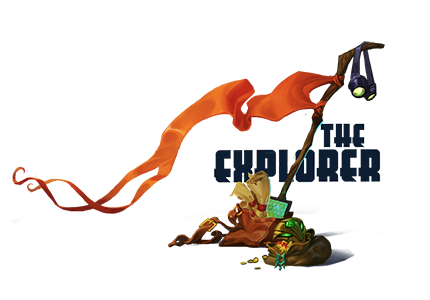
The Explorer path is all about "going where no one has gone before - in a very long time" They find secret locations, navigate dangerous areas, complete jumping puzzles, etc. There are currently 8 different mission types for the Explorer:
Cartography: Making maps has never been more fun... or more dangerous! Travel into the untamed wilds of Nexus and chart territory for your faction.
Exploration: Nexus is chock full of secret places, and you'll find every one! Use a combination of technology and agility to access hidden locations!
Expedition: The uncharted frontier awaits! Strike out into the great unknown, making sure to explore every last inch of the map. Cowards need not apply.
Operations: Exploring isn't just about climbing mountains. Sometimes you gotta gear up, buckle down, and get a job done. Skills definitely pay the bills.
Scavenger Hunt: Ancient artifacts? Check. Remote, inaccessible locations? Check. Fearless explorers who laugh in the face of danger? Oh yeah.
Staking Claim: Nexus ain't big enough for everyone, and second place sucks. So get out there, plant your flag, and claim this planet for your allies.
Surveillance: Get your secret agent on! There's a war out there, and you need to set up remote surveillance devices to keep an eye on the enemy.
Tracking: Ready to hunt? Track enemies, creatures and strange anomalies through the unforgiving terrain of planet Nexus. Epic rewards? You know it.
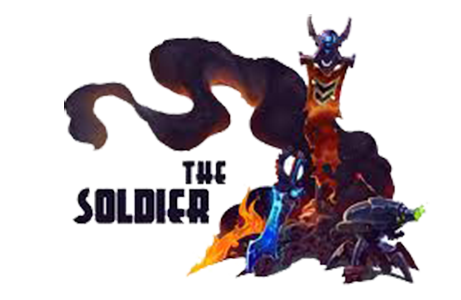
The Soldier path is pretty straightforward... You get a mission, and then you go blow something up or smash someone. In general, if you like the combat system in Wildstar - The Soldier path is going to be your best bet. There are currently 8 different mission types for the Soldier:
Assassination: Ever dreamed of being a hit man? Channel your inner assassin as you track down targets, put them in your sights, and rack up the body counts!
Demolition: Most problems can be solved with the right amount of explosives. Blow stuff up using bombs, grenades and other weapons of mass destruction. BOOM!
Rescue Op: Listen up, Soldier! We have civilians that have been taken hostage by the enemy, and we need you to get 'em out of there! Are we clear? Get moving!
SWAT: SWAT: Special Weapons And Tactics. Know what it really means? Shiny new toys! Test advanced military hardware on your foes. Mercy? Not part of the equation.
Holdout- Conquer: Are you ready to lock, load, and start taking care of business? Defend your territory against waves of hostile enemies. No guts, no glory!
Holdout- Security: No one likes a thief. That's where you come in. Defend your loot against dirty underhanded criminals, and crack some skulls with the hammer of justice!
Holdout- First Strike: Hit 'em hard, and hit 'em fast! Strike your targets and destroy them before they call in reinforcements, then bask in the glow of your badassitude!
Holdout- Protect: Being a hero ain't easy... but it's time to step up. Defend allies against incoming waves of hostiles, ensuring they survive another day!
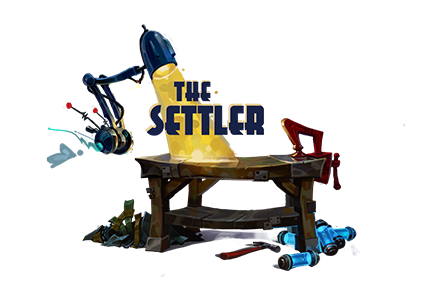
The Settler path is for players who want to develop cities / temporary sanctuaries and place buff stations that help other players (and yourself). Having a Settler in the zone provides some very important buffs that make the questing or gameplay in the area faster and more fun. There are currently 5 different mission types for the Settler:
Expansion: That town ain't going to improve itself.
Civil Defense: Town guards can handle the small stuff. But when the biggest, meanest monsters on Nexus come a-knocking, you'll step up and save the day!
Supply Cache: Who has time to sit around and wait for vital supplies to show up on a platter? Put on those boots and bring home the bacon!
Infrastructure: Are you ready for some serious real estate development? Then do your civic duty and build hospitals, taverns, and spaceports for your friends and allies.
Public Service: Some people just don't have the grit and backbone to get the job done. Good thing you do. Achieve tasks for the greater good, and get rewarded for it.
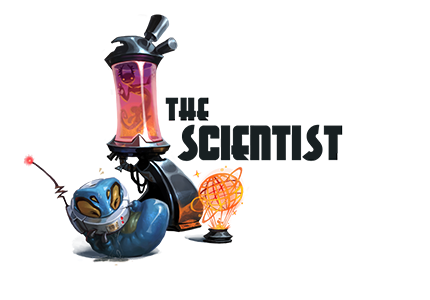
Equipped with their trusty Scanner Probe, the Scientist strives to discover the scientific secrets of Nexus. Of the four paths, only the Scientist gets an additional pet (the probe) that serves as a constant reminder to further their chosen path. To make it even more entertaining, you can customize your probe's appearance, name, etc. There are currently 8 different mission types for the Scientist:
Analysis: Time to put that big brain of yours to work! Whether it's a bug-eyed monster or the enemy's databanks, it's up to you to scan it.
Archaeology: The Eldan left behind a whole planet full of awesome. So start scanning those relics, robots, and radical machines!
Biology: Nexus is home to the craziest critters this side of the Fringe! You and your trusty scanbot better get crackin'.
Botany: Studying plants on Nexus is cool. Especially when those plants are trying to chew your face off. Stopping to smell the flowers? Not recommended.
Catalog: Knowledge is power. Which is good, because Nexus has a lot of knowledge that needs to be collected and catalogued. Time to power up!
Chemistry: Nexus is full of exotic materials and alien compounds just waiting to be studied. Are some of them ridiculously dangerous? No doubt about it.
Diagnostics: You're a scientist, and that means you can fix stuff. Whether it's a broken leg or a busted bot, you'll diagnose the problem and take care of it.
Field Study: Who knows what evil lurks in the hearts of hostile alien lifeforms? You do. Study behavior patterns among the natives. And try not to get killed.
=-=-=-=-=-=-=-=-=-=-=-=-=-=-=-=-=-=-=-=-=-=-=-=-=-=-=-=-=-=-=-=-=-=-=-=-=-=-=-=-=-=-=-=-=-=-=-=-=-=-=-=-=-=-=-=-=-=
Part 6: Character Customization
Customization! One of the leading focuses for Wildstar from the development standpoint has been how much customization the player can control for their character. This includes everything from the character, their mounts, housing, etc. There are a wide variety of options you can choose from when creating your character. You can access all of the available options by clicking the "Customize" button on the left side of your character screen.
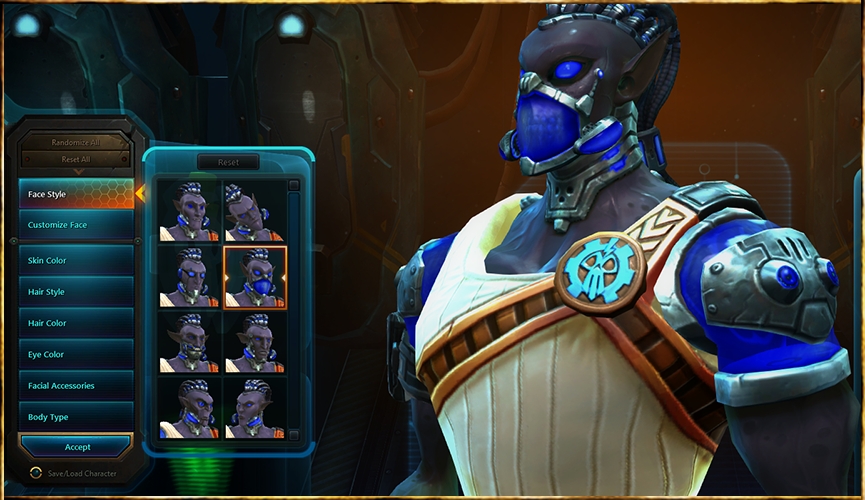
The "Face Style" allows you to try various options for your characters head. There are different looks that usually include various accessories / unique parts, so I'd highly recommend going through all of these options to see what you have available. Directly underneath Face Style is a section where you can further customize your characters face, via a large number of sliders for each part of the head.
The rest of the options are fairly self-explanatory, and include the following different options:
Skin Color
Hair Style
Hair Color
Eye Color
Body Type
There is also one or two special customization options that are different for each race. For example, in the Mordesh pictured above there is a customization option for "Facial Accessories". In this same slot when creating a Draken character you will have options for "Horn Style". Some races, such as the Granok, have two different special options.
=-=-=-=-=-=-=-=-=-=-=-=-=-=-=-=-=-=-=-=-=-=-=-=-=-=-=-=-=-=-=-=-=-=-=-=-=-=-=-=-=-=-=-=-=-=-=-=-=-=-=-=-=-=-=-=-=-=
Part 7: The Combat System
Telegraphs
The combat system in WIldstar is easily one of the most exciting parts about the game. The developers have taken cues from some other successful combat systems, add a few new features of their own, and ultimately put together a combat system that is really fun to play. If you've watched any gameplay videos or tested Wildstar yourself, the first feature of the combat system that you probably noticed is the "telegraphs". Everything in Wildstar combat revolves around the telegraphs. What I mean by "telegraph" is a visual representation of where your attacks / heals / etc. will land, and any enemy attacks as well (show up as red). Furthermore, the telegraphs will show up as different colors on your UI:
Blue: Abilities that you are in the process of casting
Green: Healing / Buff abilities casted by you or an ally
Orange: Abilities being casted by your allies
Red: Enemy attacks that you want to avoid
Purple: Enemy healing / debuff abilities
The telegraphs themselves even serve as status bars for when any timed abilities will go off. If you look at a telegraph, such as the one in the screenshot below - you will see a darker area and a lighter area.

Basically, the way this works is that the lit up area will start at the skill's origin (you or your enemy) and slowly spread until it reaches the farthest side away from the source. As soon as the telegraph is "filled" the skill goes off and either causes damage / heals / etc. This system encourages you to actively move around to avoid enemy attacks - and aim to make sure that your attacks / heals hit. In Wildstar, you can usually see exactly where the incoming attacks are coming from. You also will learn what types of attacks your enemy is using, so you will know how to get out of danger.
There is also an interesting new twist to the timing of combat telegraphs in Wildstar. If you interrupt or stun an enemy while they are in the middle of an attack (while it is being telegraphed) - they will be temporarily stunned and unable to use abilities. Their nameplate will automatically change to a purple color to show this special "stunned" status.
Crowd Control
One of the more innovative mechanics in WIldstar combat is the Crowd Control system. As opposed to most other MMORPG's where crowd control effects are represented by a little icon next to the target's nameplate - in Wildstar you literally see the effects in your UI and how your character operates. For the sake of explanation, I will go over each of the different effects as if your character was being affected by them:
Blind: Your screen will darken until you can only see a very small portion of your UI / screen. You can either wait or out, or it can be removed with a "cleanse" ability.
Disorient: This effect will cause your movements to be reversed. In other words, if you press left - your character will move right. This effect can be cleansed.
Knockback: This status will push you away from the caster and prevent you from casting. You can dash to remove this status.
Knockdown: Exactly as the name says - you get knocked down onto the ground. You can use your dash ability to stand back up.
Root: When rooted you will be unable to move. There are special abilities for breaking out of root effects, and they are labeled as such.
Stun: As expected, a stunned character will not be able to move or use abilities. If you rapidly tap "F" you can break out of a stun.
Subdue: This is equivalent to being "disarmed", but in Wildstar you literally will drop your weapon and you have to run over to it to pick up the weapon again.
Tether: Your character will be anchored to one specific spot on the ground. You can only move in the direction towards the anchor. You can attack the anchor to destroy it, freeing you to move.
Some of the crowd control abilities mentioned above can really ruin your day, but there is some good news! There are a number of self-buff and group-buff abilities in Wildstar that give your character(s) "Interrupt Armor". Essentially what this means is that for each stack of Interrupt Armor on your character, you will ignore one incoming crowd control ability. Not only does this come into play for normal PvE or PvP, but it is even more important for larger PvE group encounters and raids where managing stacks of Interrupt Armor will be necessary to your survival. Also, one thing that many people might not expect is that enemy mobs utilize the Impact Armor mechanic in regards to mob scaling. For example, say you have a boss mob that is intended as a 5-man encounter. The more characters that join in the fight beyond 5 will scale the mob to make it harder and harder to defeat. Wildstar handles this scaling by adding more and more stacks of Impact Armor to the mob as more players join the battle.
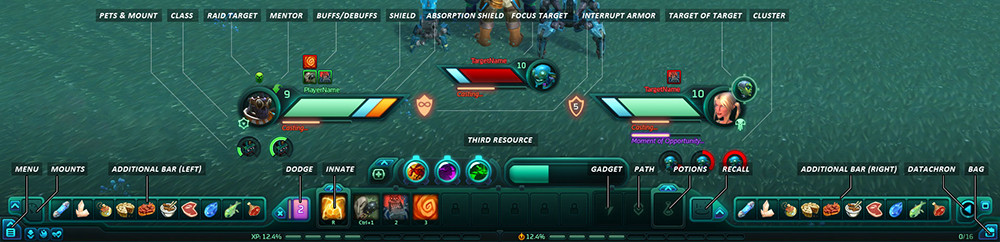
The Action Bar
Say goodbye to cluttered UI's with hundreds of buttons to organize and memorize where everything is - Wildstar instead chooses to go with a simpler idea. There are 8 ability slots (#1- , one slot for your innate class special ability, one slot for gadget, one slot for path, and one slot for potions. There are also additional bars you can add if needed - see the "Additional Bar (Left) or (Right)" in the above screenshot. Now, keep in mind that the Wildstar devs have already stated that they are strongly supporting the Addon / Mod player community for Wildstar. In fact, there is even an Addon section built into the main menu system when you are in-game. That being said, there are likely going to be more and more action bar options after Wildstar launches. I will go into the different ability setups / specs later in this guide, but now let's just say that the abilities you choose for the action bar slots will drastically impact how your character performs. If you are struggling with leveling up in one particular class, try swapping out a few abilities and look into a new strategy.
On a side note - you're probably wondering what the "Gadget" slot does. In Wildstar there are items with the category of "Gadget", where once you equip them on your character you are granted with a special 1-click ability (specific to that gadget). Nothing massively game-changing there, but I just thought I would point it out.
PvP / PvE Differences
It is important to note that some abilities function differently in PvE vs. PvP. This is Wildstar's answer to the age old question of "how do you balance an ability for PvP without nerfing it's effectiveness in PvE?". For example, any taunt abilities will reduce the enemy's damage against your allies (but not against the taunt caster). In general your gear and weapons are affected in the same way. There is actually a completely separate set of PvP gear that can only be used in PvP, and thus any item balancing PvP will not affect PvE. The PvP gear includes two new stats - PvP Defense (negates some damage from enemy players) and PvP Offense (ignores a percentage of PvP Defense).
AMP's: Advanced Modification Protocol
The AMP's window (located on the 2nd tab next to your Abilities window) is where you will find your more advanced customization options. Basically, these AMP's will further advance your character in Assault, Utility, or Support roles - or hybrids between any of the main 3 sections. As you invest points in each section, it will eventually unlock the next tier of AMP's. In case you were not already aware, here is what each section is designed for:
Assault: Additional improvements or changes to your abilities that deal damage
Support: Improves your healing, tanking, or other abilities that benefit your group members
Utility: Increases the effectiveness of your crowd control, movement, and special circumstance abilities
It is also important to note that some AMP's unlock new abilities for your character that would otherwise not be available. You can mouse over each AMP spot on the AMP's grid to see what bonus you will gain from investing an AMP point there (even if you haven't unlocked that spot yet).
Death in Wildstar
When your character dies in Wildstar, you are presented with possible options. You can either resurrect at the nearest Holo-Crypt (zone spawn point), or pay a fee to be resurrected at your current location. Please keep in mind that resurrecting at your current location cannot be used repeatedly, as there is a 30min cooldown before you can use it again.
=-=-=-=-=-=-=-=-=-=-=-=-=-=-=-=-=-=-=-=-=-=-=-=-=-=-=-=-=-=-=-=-=-=-=-=-=-=-=-=-=-=-=-=-=-=-=-=-=-=-=-=-=-=-=-=-=-=
Part 8: Mounts & Travel Systems

In Wildstar, mounts can be something that you temporarily use for a specific quest - or something permanent that always stays with you. There are "Mount Vendors" spread throughout the game that sell basic mounts. There are also a number of other ways that you can get a new mount through quest rewards, reputation vendors, drops, etc. For example, if you purchased the Deluxe Edition of Wildstar, you automatically will get the Eldan Hoverboard mount as shown above. The first mounts become available to your character at level 15, and you gain access to your first hoverboard at level 25.

It is important to note that you cannot customize the basic mounts from the Mount Vendors, but you can certainly do so with the mounts you obtain from other sources. I'm not just talking about changing a color or two - there are many many MANY customization options for your mount. Let's take hoverboards for example, you can start with the basic hoverboard - and then add or remove parts until what you end up with isn't even recognizable compared to the original. As with almost every gameplay aspect in Wildstar, the devs have put a lot of time and effort into a custom options for your mounts.
In regards to the speed of your mounts, on of my favorite parts of the Wildstar system is that the mount itself does not determine your mounted speed. Instead, as you go up in level, you are able to learn new levels of riding skill that increase your speed. Because of this system, the first mount you get at level 15 will be the same speed as a high-end mount that you get later in the game.
In addition the personal mounts, there are two other methods of transportation worth mentioning. The first is the Taxi service. In all camps / cities there is a Taxi Kiosk that can quickly move your character from area to area for a small fee. Note that you must first unlock each Taxi terminal by visiting a new camp / city through normal means (i.e. walking there). Other than Taxi movement; you can bind your location at a Transmat Terminal. This allows you to teleport to that Transmat Terminal, but keep in mind that you have a 1 hour cooldown before you will be able to use this ability again.
Lastly, you do have the option of instantly moving to your Housing Plot once you have it set up. More on that in our next section.
In addition to your faction, race, and class - you also get to choose your character's Path. There are four separate Paths you can choose from:
The Explorer path is all about "going where no one has gone before - in a very long time"
They find secret locations, navigate dangerous areas, complete jumping puzzles, etc. There are currently 8 different mission types for the Explorer:Cartography: Making maps has never been more fun... or more dangerous! Travel into the untamed wilds of Nexus and chart territory for your faction.
Exploration: Nexus is chock full of secret places, and you'll find every one! Use a combination of technology and agility to access hidden locations!
Expedition: The uncharted frontier awaits! Strike out into the great unknown, making sure to explore every last inch of the map. Cowards need not apply.
Operations: Exploring isn't just about climbing mountains. Sometimes you gotta gear up, buckle down, and get a job done. Skills definitely pay the bills.
Scavenger Hunt: Ancient artifacts? Check. Remote, inaccessible locations? Check. Fearless explorers who laugh in the face of danger? Oh yeah.
Staking Claim: Nexus ain't big enough for everyone, and second place sucks. So get out there, plant your flag, and claim this planet for your allies.
Surveillance: Get your secret agent on! There's a war out there, and you need to set up remote surveillance devices to keep an eye on the enemy.
Tracking: Ready to hunt? Track enemies, creatures and strange anomalies through the unforgiving terrain of planet Nexus. Epic rewards? You know it.
The Soldier path is pretty straightforward... You get a mission, and then you go blow something up or smash someone.
In general, if you like the combat system in Wildstar - The Soldier path is going to be your best bet. There are currently 8 different mission types for the Soldier:Assassination: Ever dreamed of being a hit man? Channel your inner assassin as you track down targets, put them in your sights, and rack up the body counts!
Demolition: Most problems can be solved with the right amount of explosives. Blow stuff up using bombs, grenades and other weapons of mass destruction. BOOM!
Rescue Op: Listen up, Soldier! We have civilians that have been taken hostage by the enemy, and we need you to get 'em out of there! Are we clear? Get moving!
SWAT: SWAT: Special Weapons And Tactics. Know what it really means? Shiny new toys! Test advanced military hardware on your foes. Mercy? Not part of the equation.
Holdout- Conquer: Are you ready to lock, load, and start taking care of business? Defend your territory against waves of hostile enemies. No guts, no glory!
Holdout- Security: No one likes a thief. That's where you come in. Defend your loot against dirty underhanded criminals, and crack some skulls with the hammer of justice!
Holdout- First Strike: Hit 'em hard, and hit 'em fast! Strike your targets and destroy them before they call in reinforcements, then bask in the glow of your badassitude!
Holdout- Protect: Being a hero ain't easy... but it's time to step up. Defend allies against incoming waves of hostiles, ensuring they survive another day!
The Settler path is for players who want to develop cities / temporary sanctuaries and place buff stations that help other players (and yourself). Having a Settler in the zone provides some very important buffs that make the questing or gameplay in the area faster and more fun. There are currently 5 different mission types for the Settler:
Expansion: That town ain't going to improve itself.
Civil Defense: Town guards can handle the small stuff. But when the biggest, meanest monsters on Nexus come a-knocking, you'll step up and save the day!
Supply Cache: Who has time to sit around and wait for vital supplies to show up on a platter? Put on those boots and bring home the bacon!
Infrastructure: Are you ready for some serious real estate development? Then do your civic duty and build hospitals, taverns, and spaceports for your friends and allies.
Public Service: Some people just don't have the grit and backbone to get the job done. Good thing you do. Achieve tasks for the greater good, and get rewarded for it.
Equipped with their trusty Scanner Probe, the Scientist strives to discover the scientific secrets of Nexus. Of the four paths, only the Scientist gets an additional pet (the probe) that serves as a constant reminder to further their chosen path. To make it even more entertaining, you can customize your probe's appearance, name, etc. There are currently 8 different mission types for the Scientist:
Analysis: Time to put that big brain of yours to work! Whether it's a bug-eyed monster or the enemy's databanks, it's up to you to scan it.
Archaeology: The Eldan left behind a whole planet full of awesome. So start scanning those relics, robots, and radical machines!
Biology: Nexus is home to the craziest critters this side of the Fringe! You and your trusty scanbot better get crackin'.
Botany: Studying plants on Nexus is cool. Especially when those plants are trying to chew your face off. Stopping to smell the flowers? Not recommended.
Catalog: Knowledge is power. Which is good, because Nexus has a lot of knowledge that needs to be collected and catalogued. Time to power up!
Chemistry: Nexus is full of exotic materials and alien compounds just waiting to be studied. Are some of them ridiculously dangerous? No doubt about it.
Diagnostics: You're a scientist, and that means you can fix stuff. Whether it's a broken leg or a busted bot, you'll diagnose the problem and take care of it.
Field Study: Who knows what evil lurks in the hearts of hostile alien lifeforms? You do. Study behavior patterns among the natives. And try not to get killed.
=-=-=-=-=-=-=-=-=-=-=-=-=-=-=-=-=-=-=-=-=-=-=-=-=-=-=-=-=-=-=-=-=-=-=-=-=-=-=-=-=-=-=-=-=-=-=-=-=-=-=-=-=-=-=-=-=-=
Part 6: Character Customization
Customization! One of the leading focuses for Wildstar from the development standpoint has been how much customization the player can control for their character. This includes everything from the character, their mounts, housing, etc. There are a wide variety of options you can choose from when creating your character. You can access all of the available options by clicking the "Customize" button on the left side of your character screen.
The "Face Style" allows you to try various options for your characters head. There are different looks that usually include various accessories / unique parts, so I'd highly recommend going through all of these options to see what you have available. Directly underneath Face Style is a section where you can further customize your characters face, via a large number of sliders for each part of the head.
The rest of the options are fairly self-explanatory, and include the following different options:
Skin Color
Hair Style
Hair Color
Eye Color
Body Type
There is also one or two special customization options that are different for each race. For example, in the Mordesh pictured above there is a customization option for "Facial Accessories". In this same slot when creating a Draken character you will have options for "Horn Style". Some races, such as the Granok, have two different special options.
=-=-=-=-=-=-=-=-=-=-=-=-=-=-=-=-=-=-=-=-=-=-=-=-=-=-=-=-=-=-=-=-=-=-=-=-=-=-=-=-=-=-=-=-=-=-=-=-=-=-=-=-=-=-=-=-=-=
Part 7: The Combat System
Telegraphs
The combat system in WIldstar is easily one of the most exciting parts about the game. The developers have taken cues from some other successful combat systems, add a few new features of their own, and ultimately put together a combat system that is really fun to play. If you've watched any gameplay videos or tested Wildstar yourself, the first feature of the combat system that you probably noticed is the "telegraphs". Everything in Wildstar combat revolves around the telegraphs. What I mean by "telegraph" is a visual representation of where your attacks / heals / etc. will land, and any enemy attacks as well (show up as red). Furthermore, the telegraphs will show up as different colors on your UI:
Blue: Abilities that you are in the process of casting
Green: Healing / Buff abilities casted by you or an ally
Orange: Abilities being casted by your allies
Red: Enemy attacks that you want to avoid
Purple: Enemy healing / debuff abilities
The telegraphs themselves even serve as status bars for when any timed abilities will go off. If you look at a telegraph, such as the one in the screenshot below - you will see a darker area and a lighter area.
Basically, the way this works is that the lit up area will start at the skill's origin (you or your enemy) and slowly spread until it reaches the farthest side away from the source. As soon as the telegraph is "filled" the skill goes off and either causes damage / heals / etc. This system encourages you to actively move around to avoid enemy attacks - and aim to make sure that your attacks / heals hit. In Wildstar, you can usually see exactly where the incoming attacks are coming from. You also will learn what types of attacks your enemy is using, so you will know how to get out of danger.
There is also an interesting new twist to the timing of combat telegraphs in Wildstar. If you interrupt or stun an enemy while they are in the middle of an attack (while it is being telegraphed) - they will be temporarily stunned and unable to use abilities. Their nameplate will automatically change to a purple color to show this special "stunned" status.
Crowd Control
One of the more innovative mechanics in WIldstar combat is the Crowd Control system. As opposed to most other MMORPG's where crowd control effects are represented by a little icon next to the target's nameplate - in Wildstar you literally see the effects in your UI and how your character operates. For the sake of explanation, I will go over each of the different effects as if your character was being affected by them:
Blind: Your screen will darken until you can only see a very small portion of your UI / screen. You can either wait or out, or it can be removed with a "cleanse" ability.
Disorient: This effect will cause your movements to be reversed. In other words, if you press left - your character will move right. This effect can be cleansed.
Knockback: This status will push you away from the caster and prevent you from casting. You can dash to remove this status.
Knockdown: Exactly as the name says - you get knocked down onto the ground. You can use your dash ability to stand back up.
Root: When rooted you will be unable to move. There are special abilities for breaking out of root effects, and they are labeled as such.
Stun: As expected, a stunned character will not be able to move or use abilities. If you rapidly tap "F" you can break out of a stun.
Subdue: This is equivalent to being "disarmed", but in Wildstar you literally will drop your weapon and you have to run over to it to pick up the weapon again.
Tether: Your character will be anchored to one specific spot on the ground. You can only move in the direction towards the anchor. You can attack the anchor to destroy it, freeing you to move.
Some of the crowd control abilities mentioned above can really ruin your day, but there is some good news! There are a number of self-buff and group-buff abilities in Wildstar that give your character(s) "Interrupt Armor". Essentially what this means is that for each stack of Interrupt Armor on your character, you will ignore one incoming crowd control ability. Not only does this come into play for normal PvE or PvP, but it is even more important for larger PvE group encounters and raids where managing stacks of Interrupt Armor will be necessary to your survival. Also, one thing that many people might not expect is that enemy mobs utilize the Impact Armor mechanic in regards to mob scaling. For example, say you have a boss mob that is intended as a 5-man encounter. The more characters that join in the fight beyond 5 will scale the mob to make it harder and harder to defeat. Wildstar handles this scaling by adding more and more stacks of Impact Armor to the mob as more players join the battle.
The Action Bar
Say goodbye to cluttered UI's with hundreds of buttons to organize and memorize where everything is - Wildstar instead chooses to go with a simpler idea. There are 8 ability slots (#1-
, one slot for your innate class special ability, one slot for gadget, one slot for path, and one slot for potions. There are also additional bars you can add if needed - see the "Additional Bar (Left) or (Right)" in the above screenshot. Now, keep in mind that the Wildstar devs have already stated that they are strongly supporting the Addon / Mod player community for Wildstar. In fact, there is even an Addon section built into the main menu system when you are in-game. That being said, there are likely going to be more and more action bar options after Wildstar launches. I will go into the different ability setups / specs later in this guide, but now let's just say that the abilities you choose for the action bar slots will drastically impact how your character performs. If you are struggling with leveling up in one particular class, try swapping out a few abilities and look into a new strategy.On a side note - you're probably wondering what the "Gadget" slot does. In Wildstar there are items with the category of "Gadget", where once you equip them on your character you are granted with a special 1-click ability (specific to that gadget). Nothing massively game-changing there, but I just thought I would point it out.
PvP / PvE Differences
It is important to note that some abilities function differently in PvE vs. PvP. This is Wildstar's answer to the age old question of "how do you balance an ability for PvP without nerfing it's effectiveness in PvE?". For example, any taunt abilities will reduce the enemy's damage against your allies (but not against the taunt caster). In general your gear and weapons are affected in the same way. There is actually a completely separate set of PvP gear that can only be used in PvP, and thus any item balancing PvP will not affect PvE. The PvP gear includes two new stats - PvP Defense (negates some damage from enemy players) and PvP Offense (ignores a percentage of PvP Defense).
AMP's: Advanced Modification Protocol
The AMP's window (located on the 2nd tab next to your Abilities window) is where you will find your more advanced customization options. Basically, these AMP's will further advance your character in Assault, Utility, or Support roles - or hybrids between any of the main 3 sections. As you invest points in each section, it will eventually unlock the next tier of AMP's. In case you were not already aware, here is what each section is designed for:
Assault: Additional improvements or changes to your abilities that deal damage
Support: Improves your healing, tanking, or other abilities that benefit your group members
Utility: Increases the effectiveness of your crowd control, movement, and special circumstance abilities
It is also important to note that some AMP's unlock new abilities for your character that would otherwise not be available. You can mouse over each AMP spot on the AMP's grid to see what bonus you will gain from investing an AMP point there (even if you haven't unlocked that spot yet).
Death in Wildstar
When your character dies in Wildstar, you are presented with possible options. You can either resurrect at the nearest Holo-Crypt (zone spawn point), or pay a fee to be resurrected at your current location. Please keep in mind that resurrecting at your current location cannot be used repeatedly, as there is a 30min cooldown before you can use it again.
=-=-=-=-=-=-=-=-=-=-=-=-=-=-=-=-=-=-=-=-=-=-=-=-=-=-=-=-=-=-=-=-=-=-=-=-=-=-=-=-=-=-=-=-=-=-=-=-=-=-=-=-=-=-=-=-=-=
Part 8: Mounts & Travel Systems
In Wildstar, mounts can be something that you temporarily use for a specific quest - or something permanent that always stays with you. There are "Mount Vendors" spread throughout the game that sell basic mounts. There are also a number of other ways that you can get a new mount through quest rewards, reputation vendors, drops, etc. For example, if you purchased the Deluxe Edition of Wildstar, you automatically will get the Eldan Hoverboard mount as shown above. The first mounts become available to your character at level 15, and you gain access to your first hoverboard at level 25.
It is important to note that you cannot customize the basic mounts from the Mount Vendors, but you can certainly do so with the mounts you obtain from other sources. I'm not just talking about changing a color or two - there are many many MANY customization options for your mount. Let's take hoverboards for example, you can start with the basic hoverboard - and then add or remove parts until what you end up with isn't even recognizable compared to the original.
As with almost every gameplay aspect in Wildstar, the devs have put a lot of time and effort into a custom options for your mounts.In regards to the speed of your mounts, on of my favorite parts of the Wildstar system is that the mount itself does not determine your mounted speed. Instead, as you go up in level, you are able to learn new levels of riding skill that increase your speed. Because of this system, the first mount you get at level 15 will be the same speed as a high-end mount that you get later in the game.
In addition the personal mounts, there are two other methods of transportation worth mentioning. The first is the Taxi service. In all camps / cities there is a Taxi Kiosk that can quickly move your character from area to area for a small fee. Note that you must first unlock each Taxi terminal by visiting a new camp / city through normal means (i.e. walking there). Other than Taxi movement; you can bind your location at a Transmat Terminal. This allows you to teleport to that Transmat Terminal, but keep in mind that you have a 1 hour cooldown before you will be able to use this ability again.
Lastly, you do have the option of instantly moving to your Housing Plot once you have it set up. More on that in our next section.